Bring the work of running your venue together: bookings, memberships, activities, commerce, staff, hardware, CRM and intelligence. One connected operating model, built around your experience.
A guest is more than an account. A booking is more than a time slot. COPA carries the relationships between people, activity, service and physical systems.
01
Guest
Identity & membership
02
Visit
Booking & participants
03
Experience
Activity & service
04
Operation
People & physical systems
FROM MANY PLATFORMS TO ONE
The gaps between systems become everybody’s problem.
The expensive part isn’t only the subscriptions. It’s every handoff, repeated question and manual fix needed to make separate tools feel like one venue.
FOR YOUR GUESTS
One night out. A string of obstacles.
They book on one site, create another account, complete a separate waiver and explain their membership at the desk. Then the tab starts from scratch.
They came to enjoy your venue. They end up navigating your software.FOR YOUR STAFF
Your best people become the integration.
They match names across screens, check benefits by hand, relay orders, chase device issues and re-enter the same information. Every exception needs someone who knows the workaround.
The queue gets longer while hospitality becomes troubleshooting.FOR YOUR BRAND
Your name is on every broken handoff.
You invest in the space, the service and the identity. Then booking pages, emails and checkout screens send guests through a patchwork of other experiences.
Guests don’t blame your technology stack. They remember your venue.
ONE SIMPLE REQUEST. TOO MANY SYSTEMS.
“Can we stay another half hour?”
Check the booking calendar. Verify the member rate somewhere else. Update the activity timer. Add the charge to the POS. Tell the next shift what changed.
Miss one step and the guest gets a different price, the session ends early or the next booking walks into an occupied space.
WITH COPA
The visit carries the context.
Availability, member benefits, session time and the tab belong to the same operating flow. An extension starts with the actual visit—not a search across screens.
Bring the core work into COPA. Connect the specialist systems you keep. Give guests one branded experience and staff the context to deliver it.
THE DISCONNECTED STACK
The member has paid. The booking tool doesn’t know it. Staff search another list while the guest proves a benefit they already bought. One person, multiple records, no shared memory.
copa /ONE OPERATING MODEL
One relationship that follows the guest through the visit.
Guest accounts and profiles
Memberships, benefits and credits
Corporate relationships and crews
Visit history and lifecycle messaging
CONNECT WHAT YOU KEEP
Keep useful messaging and digital-wallet providers connected to the same guest context.
A member books with their benefits, arrives with their credential and stays connected to their history.
A short walkthrough of COPA’s booking, staff and guest interfaces. These captures use actual product components, fictional records and neutral styling.
Actual product components · Fictional data · Neutral styling Open image to inspect ↗
01 / BOOK
A time, a price and a reason to choose you.
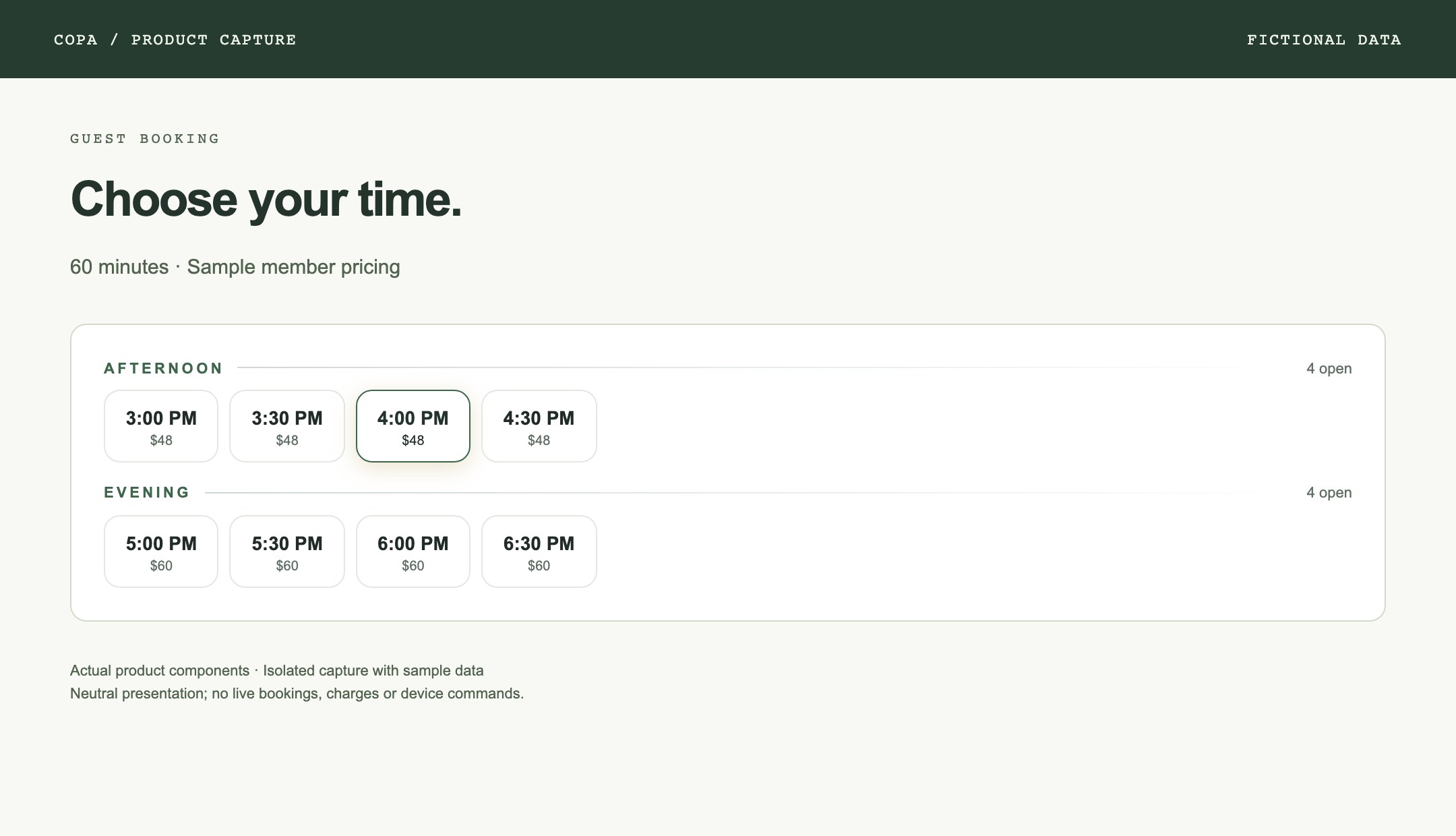
The actual booking time picker groups availability by part of the day and displays the member rate supplied to it. This sample shows a selected slot and different afternoon and evening prices.
Shown: booking time picker with fictional availability and prices.
Captured from the current implementation in an isolated environment. This is a guided visual tour, not a live transaction demo. Venue branding, navigation and final configuration may differ.
WHO COPA IS FOR
You run an experience. The software should keep up.
COPA is built for operators coordinating bookable spaces, repeat guests, memberships, hospitality and a team on the floor. The strongest fit is a venue where those jobs overlap every day.
CLOSEST TO TODAY’S PRODUCT
Golf & competitive socializing.
Simulator venues, social darts and activity-led hospitality. Timed sessions, groups, food and drink, and physical equipment are central to the operating model built at the first venue.
LET’S ASSESS THE FIT
Clubs & hybrid activity venues.
Racquet, training, bowling and other bookable experiences may share the same operating problems. We assess their resource rules, scoring systems, equipment and service model before proposing a rollout.
BUILT AROUND YOUR STAGE
Opening, upgrading or expanding.
Plan the stack before a new opening. Replace the manual glue in an existing venue. Or assess a repeatable operating model for more locations—with brand and location requirements scoped first.
Does this sound like your venue?
You sell time in bays, lanes, rooms or other resources.
Members, groups and returning guests matter to the business.
Activity, service and payment need to follow the same visit.
Staff are switching apps to answer ordinary guest questions.
A PRACTICAL FIT CONVERSATION
If you only need a simple appointment calendar or standalone till, a full venue operating system may be more than you need. COPA is for the complexity between those tools.
We’re discussing scoped operator and design-partner rollouts. New brands and additional venue types require implementation work, not just a logo change.
Open a capability group to see the work it covers—and what becomes possible when it shares context with the rest of the venue.
01 / Guest & MemberRecognize the person, not just the reservation.
Connect the guest-facing website, account and membership to the visit. Benefits and relationships belong to the guest wherever the experience takes them.
WHAT THAT LOOKS LIKE
A returning member arrives with their identity, booking and benefits already connected.
Accounts and identity
Memberships, tiers and benefits
Corporate relationships
Apple and Google Wallet credentials
Native mobile experiences
Customer history and CRM
Lifecycle messaging
02 / Booking & RevenueMake the space work with the schedule.
Coordinate resources, activities, prices and participants with authoritative availability. Build the next sale on the context of the current visit.
WHAT THAT LOOKS LIKE
A group wants longer. COPA checks the next booking, applies the right price and confirms before extending.
Live, activity-aware availability
Temporary holds and confirmed bookings
Membership pricing and credits
Participants and crews
Waitlists and gap recovery
Extensions and rebooking
Dynamic pricing
03 / Play & PerformanceThe activity is part of the relationship.
Carry session and gameplay context into the experiences guests return for: practice, coaching, competition and playing together.
WHAT THAT LOOKS LIKE
The end of a session can become the start of a coaching conversation or the next competition.
Activity launch and session control
Gameplay history
Shot and round capture for supported systems
Player performance
Coaching and lessons
Programs and challenges
Shareable round cards
04 / CommerceEvery order has a place in the visit.
Connect food, drinks, retail and activity purchases with the tab, service destination and payment state. Keep exceptions in the same operational record.
WHAT THAT LOOKS LIKE
An order from the room reaches service with its visit context, rather than becoming a separate transaction to reconcile later.
POS and booking-attached tabs
In-bay, mobile and staff ordering
Kitchen and bar displays
Split payments and house accounts
Refunds, comps and voids
Terminal payments and provider adapters
Settlements, accounting and retail
05 / Staff & OperationsGive the team a common picture.
Connect the people running the floor to the work in front of them. Managers can coordinate service while keeping approvals and access under control.
WHAT THAT LOOKS LIKE
A manager handles a service exception with the booking, tab and staff context in view.
Staff app and manager operations room
Scheduling and availability
Time off and shift swaps
Time clock and timesheets
Payroll exports
Checklists and playbooks
Roles, transaction limits and audit trails
06 / Venue SystemsReach the equipment behind the experience.
Bring the physical estate into the operating model, from activity PCs and identity readers to displays and the systems that need recovery.
WHAT THAT LOOKS LIKE
A display fault becomes a visible operational issue tied to the room, rather than a surprise reported by the guest.
Windows Bay OS and kiosks
QR/NFC readers and companion devices
Display and projector control
Printers and payment terminals
Device health and fleet management
Remote commands, diagnostics and recovery
Music and environment integrations
07 / Community & RetentionMake your venue part of the routine.
Build continuity beyond the booking. Connect the reasons people return with the people they return with.
WHAT THAT LOOKS LIKE
The venue can connect a guest’s activity history, crew and membership when shaping the next experience.
Leagues and programs
Challenges and leaderboards
Crews and group relationships
XP, status and club records
Player and visit history
Membership engagement
Relevant follow-up and rebooking
08 / Multi-VenueKeep the model consistent. Let the location be local.
Bring oversight and repeatable operations together with venue-specific resources, hours, pricing and systems.
WHAT THAT LOOKS LIKE
A new location starts from a defined operating model, then gets the configuration and readiness checks it needs.
Central venue switching
Local hours and closures
Activities, resources and pricing
Taxes, terminals and providers
Local display and venue configuration
Fleet and integration health
Launch readiness and rollout controls
09 / Intelligence & AutomationTurn context into the next useful action.
COPA connects live venue state to automation and Wally. Actions stay inside the same pricing, payment and permission rules as the rest of the operation.
WHAT THAT LOOKS LIKE
“Can we stay longer?” becomes an availability check, a real price and a confirmed action—not a guess.
Contextual guest and operator assistance
Booking and service context
Revenue and lifecycle workflows
Operational signals and analytics
Capability-based permissions
Confirmation and audit evidence
Provider reconciliation and safe fallbacks
CONTEXT THAT DOES THE WORK
Connected where it matters.
01
Availability and price have one authority.
COPA coordinates availability, temporary holds, membership benefits, credits and booking confirmation. An extension belongs to the same visit, rather than a disconnected transaction.
Activity-aware booking
Waitlists and rebooking
Session extensions
Pricing and membership context
02
The tab belongs to the visit.
Connect activity time, in-venue ordering and payment state. Staff can work with the full service context, including split payments, house accounts and exceptions.
In-session and staff ordering
Booking-attached tabs
Kitchen and bar displays
Refunds, comps and audit records
03
Authority stays in the platform.
Pricing, permissions and payment state belong to COPA. Staff interfaces, kiosks and Wally use governed capabilities instead of inventing their own rules.
Role and capability boundaries
Confirmation for sensitive actions
Audit evidence
Reconciliation and safe fallbacks
THIS IS WHAT CONNECTED MEANS
One moment. The whole venue responds.
The value lives in the handoffs. See how the pieces work together.
GUEST → BOOKING → ROOM → COMMERCE
“Can we stay another half hour?”
A simple guest question touches more of the venue than it seems.
01
Check the space
Live availability accounts for the next booking and the activity resource.
02
Apply the right price
Membership benefits and venue pricing determine the offer.
03
Confirm the extension
The guest confirms before COPA changes the booking and payment state.
04
Keep the room in sync
The session gets the additional time and the team keeps the same visit context.
One extension. One visit. No separate booking to piece back together.
ILLUSTRATIVE WORKFLOW
FROM YOUR CURRENT STACK TO COPA
A clear path to one system.
You don’t have to decide every integration on day one. Start with the operation you want to run, then build a practical transition around it.
01
Map the stack
Start with your booking, membership, POS, staff and activity workflows. Identify duplicated work, disconnected records and systems you want to keep.
02
Shape your experience
Define your brand, activities, pricing, memberships and service model. Decide what guests see and how the team operates behind it.
03
Consolidate and connect
Move agreed workflows into COPA. Connect the specialist providers and equipment that remain. Plan data migration around the records that matter.
04
Prove it in the venue
Walk through booking, arrival, activity, ordering, payment and recovery with your team. Validate the actual hardware and permissions.
05
Roll out with a clear plan
Choose the first venue or workflow, train the team and set the go-live checks. Expand from a working operation.
THE QUESTIONS BEHIND THE DECISION
Let’s talk about the practicalities.
Does COPA replace every platform we use?
COPA brings booking, membership, commerce, staff, CRM and other venue workflows into one operating model. Specialist providers still have a place: payment processors, activity software, messaging channels and physical equipment. Together, we decide what to consolidate, what to connect and what needs further integration work.
Can we keep our POS or activity systems?
That is part of the fit assessment. COPA includes its own commerce capabilities and provider adapters. We confirm the exact provider, hardware and supported workflows before proposing a setup; a provider name alone does not guarantee every feature is supported.
Will it look and feel like our venue?
That is the intent: a guest experience built around your brand, activities, memberships and service. We define the guest-facing surfaces and branding as part of your rollout. COPA is the operating layer behind that experience.
Do we need to replace everything at once?
The transition is planned around your venue. We map dependencies, the records that need to move, the systems that remain and the workflows to validate first. The goal is a controlled change your team can operate, rather than a promise of an instant switch.
Is COPA only for golf venues?
No. COPA was developed in a venue with golf simulators and darts, but its operating model connects guests, resources, activities, service and physical systems. We assess the fit for competitive socializing, racquet venues, bowling, training facilities and hybrid activity-and-hospitality concepts.
Where is COPA today?
COPA powers its original operating venue, Loft 19, and is preparing for broader operator rollouts. We are opening conversations around venue fit and design partnerships. Current availability, branding requirements and integration scope are agreed for each deployment.
THE SYSTEM BEHIND THE EXPERIENCE
Run your whole venue.
Fewer disconnected systems. More of your experience.